SVN Subversion with TortoiseSVN for Change Control
Controlling changes and keeping track of revisions of FE model files isn’t always easy, but I’d like to share how I use SVN subversion and the free Windows software TortoiseSVN to manage finite element model files (and even associated files like spreadsheets and documents). I use it particularly for ANSYS APDL files, which are generally a number of text files and perfect for management using SVN.
It’s hard to keep track of versions and modifications, especially if you have to copy files to a server to solve. TortoiseSVN is great because of the Windows shell icons which show clearly and easily which files have been modified, created, deleted etc. The shell icon overlays are shown below:
You can regularly “commit” intended modifications to the repository and log comments and keep track of the incremental changes you make to a set of model files. The commits are tracked with a revision number. I even use SVN for spreadsheets and documents where is works very well as a simple version control system.
The repository of files is made of a “trunk” which is the main revision history, but you also use “branches” off the main trunk to take a copy of the main files and modify them for some other purpose. For me, I use branches for sensitivity studies which don’t contribute to the main trunk of files, but do require me to control the version and log them. The way SVN manages the files means that I can easily compare the differences between the trunk and a particularly sensitivity study branch that I’ve made. The comparison will highlight files that have been modified, added, deleted etc, and you can even diff the modified files to show the differences side by side. This even works for Word documents where it highlights the differences with track changes – very neat.
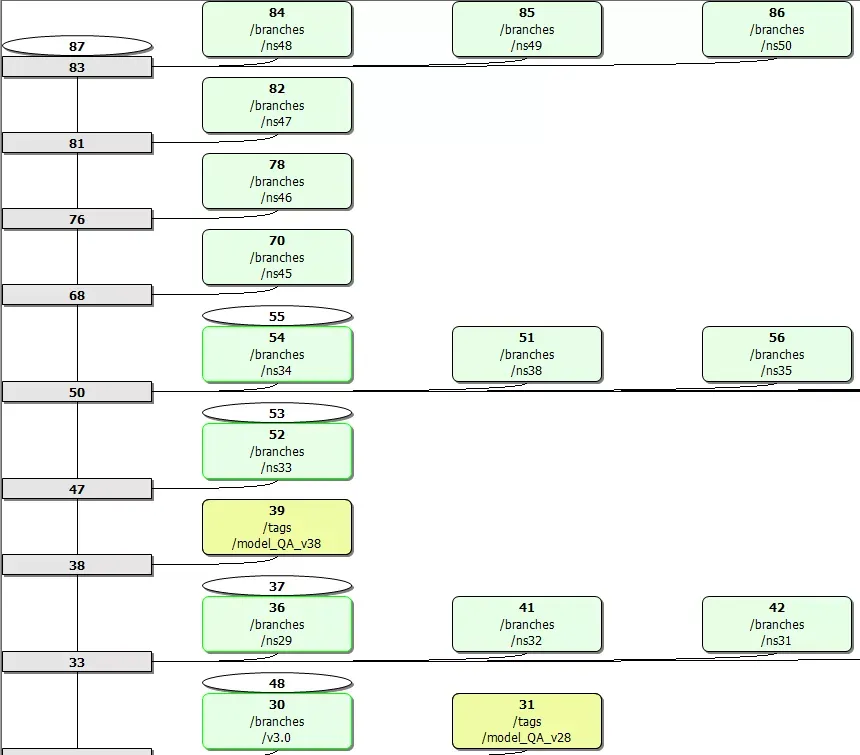
As well as the trunk and branches, there are also “tags” which I use for discrete revisions which have been internally reviewed and QA’d.
An example tree might look something like this, with the trunk in grey, the branches green and the tags yellow:
It does take a bit of learning, but the help is very good and it is very powerful in control and tracking change. And being free, means there’s not really a downside! In fact, a version for Mac would be perfect, but despite it being Windows-only, it really is very good. By the way SVN subversion itself is not Windows-specific, it’s just on it’s own it’s very useful unfriendly, and the Windows shell icons make TortoiseSVN invaluable.
Nowadays git seems to have won out over SVN for version control, but the principles are still the same.