Snakemake Analysis Workflow Management
Any given analysis or simulation usually involves taking some input data, creating loads cases, running a model, processing results, perhaps combining load cases into load combinations and then reporting on the results against the acceptance criteria. This is a workflow and can benefit significantly with the concept of workflow management. Workflow management is where a tool is used to manage the dependencies of each step in the simulation process, keeping track of the status of the inputs and outputs and only rerunning a downstream step when necessary.
This article covers implementing an analysis workflow in snakemake. Snakemake is a free software tool that helps manage dependencies between tasks, which in the context of engineering can be finite element analysis models, runs, post-processing and reporting. As well as using snakemake as a tool to manage dependencies, there are a couple of other useful concepts:
- (a) using version control (git) so that the input files and scripts (and workflow) are all controlled, and
- (b) using the concept of a software container (docker) so that the environment for the analysis is encapsulated for reproducibility.
Snakemake means that only tasks which need updating are rerun, for example if the input to that task is updated. This means that you don’t need to manually remember parts of the workflow, yet it also means that only tasks that need to be rerun and actually rerun (very helpful for FE runs which may take a couple of hours to run!).
Tutorial for Snakemake Analysis Workflow
The best way to learn more is to watch this 15 minute video tutorial showing you how to get started with a simple analysis workflow is below. All the example files are freely available on github.
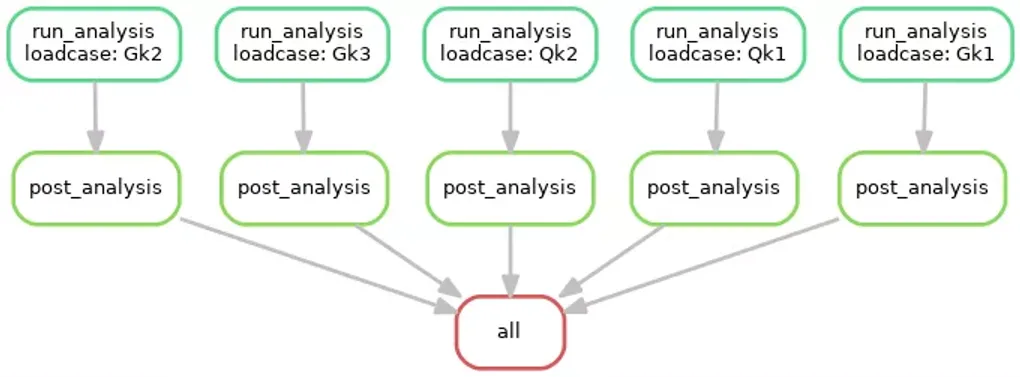
One of the very useful outputs via the snakemake process is a complete graph of all your tasks and dependencies in the form of a directed acyclic graph (DAG). This captures the complete analysis workflow, an example from the tutorial is below:
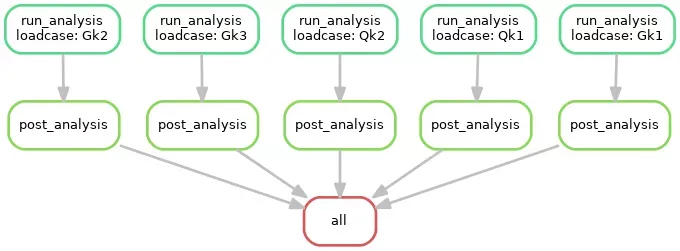
DAG for Snakemake Analysis Workflow
Closing Thoughts
So I hope that has been useful and thought-provoking. Reproducible analysis is so important, and there are existing tools out there to help us. Large-scale analysis workflows should be encapsulated in a reproducible environment, and the dependencies should be explicit so that the workflow is as automated as possible. This reduces errors, promotes provenance in the results, and is a more efficient way of working. Future work for me includes adding testing to the workflow (e.g. mesh convergence) and using Rmarkdown to collate results into a report which will also be part of the workflow so that the report will also always be updated when the results change.